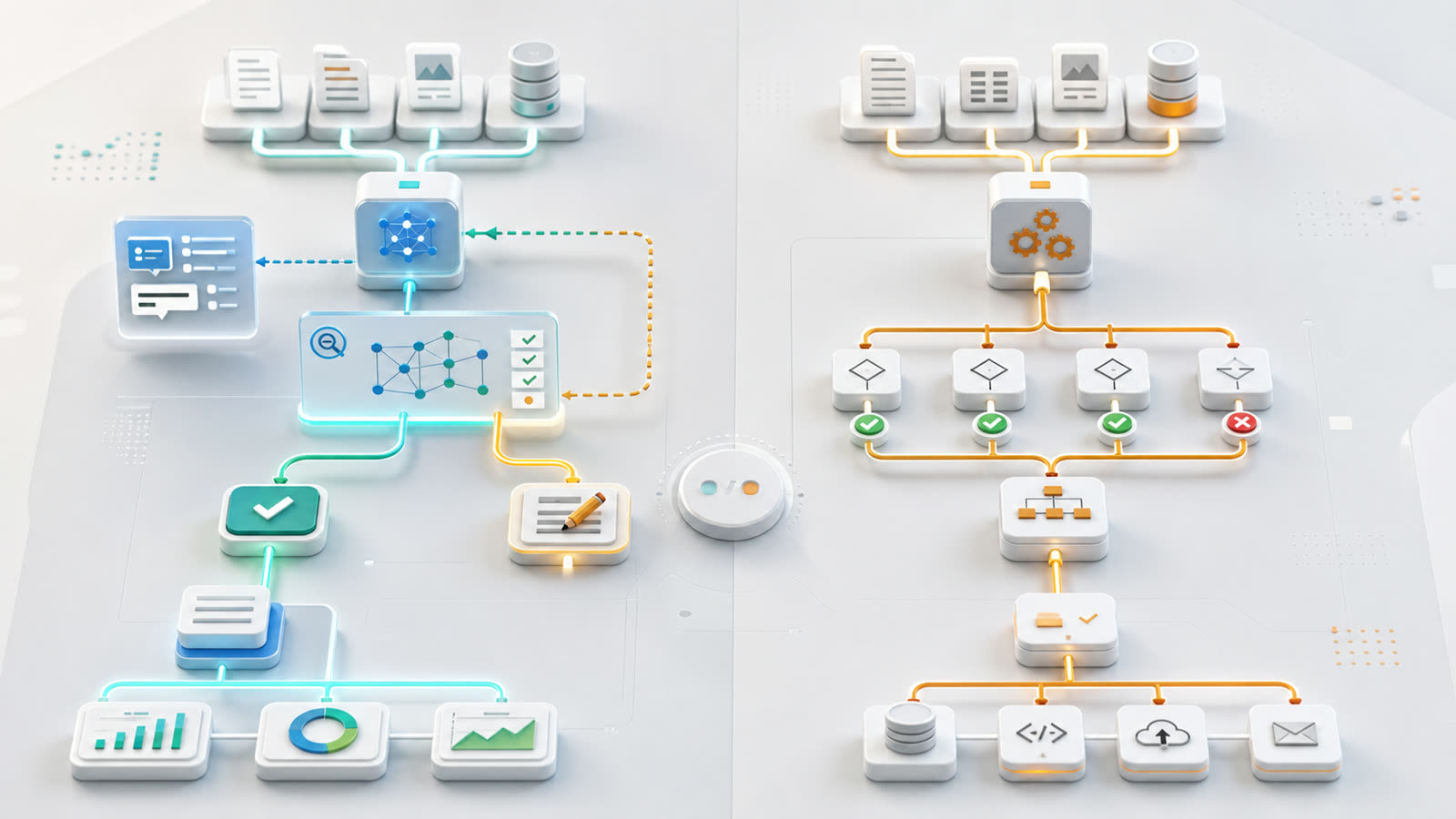
The right automation tool depends on the shape of the work
AI assistants and traditional automation are often discussed as if one replaces the other. In practice, they are better at different kinds of work. A useful automation plan starts by asking what the workflow needs: judgment, language, summarization, and review support, or predictable execution of clearly defined rules.
Traditional automation is usually the better fit when the process is stable and the decision logic is known. AI assistants are more useful when the inputs are messy, the work involves language or context, and a person still needs to review the result before action is taken. Many strong business workflows use both.
Use traditional automation when the rules are clear
Traditional automation works well when the task can be described as a dependable sequence of steps. If a form is submitted, create a CRM record. If an invoice is overdue, send an internal reminder. If a backup job fails, open an alert. If a deployment passes tests, move it to the next environment.
These workflows benefit from consistency. The same input should produce the same output every time. That makes traditional automation easier to test, monitor, and explain. It is also easier to decide who owns the workflow, what permissions it needs, and what should happen when one step fails.
For business operations, this predictability matters. A billing workflow, access-control workflow, backup alert, or customer-status sync should not improvise. It should follow rules, log what happened, and fail in a way the team can investigate.
Use AI assistants when the work needs interpretation
AI assistants are better suited to work that involves language, context, and incomplete information. They can summarize a support thread, draft a response from notes, classify incoming requests, compare a proposal against requirements, or turn meeting notes into a first-pass task list.
Those tasks are not always easy to express as rigid rules. Two customers may describe the same issue in different words. A project update may include nuance that does not fit a simple status field. A discovery note may contain useful signals, but still need a person to decide what matters.
That flexibility is the value of an AI assistant. It can reduce blank-page work and surface patterns, but the output should be treated as review-ready rather than automatically final. The assistant can prepare the draft, organize the context, and suggest next steps. A person should approve important decisions.
Start with the risk of the action
A practical way to choose between the two approaches is to look at what happens after the workflow runs. Low-risk drafting, summarizing, tagging, and internal triage are often good AI-assistant candidates. The team can review the output before it reaches a customer, changes a financial record, or updates a critical system.
Higher-risk actions usually need deterministic controls. Creating accounts, changing permissions, issuing refunds, deleting records, publishing content, or moving production infrastructure should have explicit rules and approval gates. AI can help prepare the context for those decisions, but it should not quietly make them without boundaries.
Think about input quality
Traditional automation needs structured inputs. It works best when fields are consistent, required values are present, and systems expose clean APIs. When that foundation exists, automation can move work between tools with very little ambiguity.
AI assistants can tolerate messier inputs, but that does not remove the need for good data. If customer records are duplicated, statuses mean different things in different systems, or important notes live only in someone’s inbox, the assistant may produce a confident but incomplete draft. The right answer may be a small data cleanup or integration improvement before adding more AI.
Combine AI with rules where the workflow changes hands
Many useful workflows split the work into two layers. The AI assistant handles interpretation. Traditional automation handles routing, permissions, notifications, and record updates.
For example, an assistant might summarize a new support request and suggest a category. A rule-based workflow can then place that draft in the right queue, notify the right person, and wait for approval. After approval, deterministic automation can update the ticket, create a task, or send a response through a known system path.
This pattern keeps the flexible part of the workflow where it belongs and keeps the operational part testable. It also makes troubleshooting easier because the team can see whether the issue came from the source data, the assistant output, the approval step, or the system integration.
Review steps are part of the design
Review should not be an afterthought. If an AI assistant drafts content, proposes a customer response, or interprets business data, the reviewer needs the right context. That may include links to source records, a summary of what changed, confidence notes, exception flags, and a clear approve-or-revise path.
Traditional automation also needs review in the right places. A workflow can be fully automated for routine events while escalating unusual cases. The goal is not to keep humans in every step. The goal is to put human attention where it improves quality and reduces operational risk.
Choose the simpler tool first
If a workflow can be solved with clear rules, stable APIs, and a small amount of configuration, traditional automation is usually the simpler and more maintainable choice. It will be easier to test, easier to document, and easier for the team to trust.
If the workflow gets stuck because the input is mostly language, the work requires summarization, or the team needs help turning rough information into a useful first draft, an AI assistant may be the better starting point. The strongest results usually come from pairing that assistant with clear rules, scoped permissions, logging, and human review.
Next step
Before choosing a tool, map the workflow as it works today. Identify the inputs, decisions, systems, exceptions, and review points. Then decide which parts need flexible assistance and which parts need predictable execution. Contact Code Etcetera to review whether your current systems are ready for practical automation.